
Intro to Ruby
Class 0
Welcome!
Girl Develop It is here to provide affordable and accessible programs to learn software through mentorship and hands-on instruction.
Some "rules"
- We are here for you!
- Every question is important.
- Help each other.
- Have fun!
Welcome!
Tell us about yourself.
- Who are you?
- What do you hope to get out of this class?
- What is your favorite ice cream or frozen dessert?
What we will cover today
- Installing Ruby
- Installing all the other tools you'll need
- Command Line Basics
A little help from our friends...
We'll be using Railsbridge's Installfest instructions to get set up. Railsbridge is an awesome organization that we're friends with and you should be, too!
Installfest
Just work through the instructions for your operating system. Stop after the "Install an Editor" step. Ask a volunteer for help if you get stuck or lost. This process should take about an hour.
Here it is!
Intro to Terminal
Working in the terminal can be really intimidating at first!
With practice, navigation and file manipulation is significantly faster in the terminal than in the GUI.
Professional software developers use the terminal all the time, and this class will require some use of it.
Intro to Terminal
Mac & Linux users: Open Terminal
Windows users: Open Command Prompt With Ruby on Rails
We will not be using Windows "cmd" program, as it uses a different syntax than *NIX systems.
Intro to Terminal Prompt
The line that appears in the terminal when you open it is called the prompt. It usually contains information about the user and current directory. It can be customized.





Terminal instructions often start a line with a $. This represents the last character in the prompt, you don't need to type it.
Terminal Cheatsheet
| . | the current directory- ex: "touch ./wow.txt" |
| .. | the parent of current directory - ex: "cd ../RubyParty" |
| ~ | the root directory- ex: "cd ~/Pictures" |
| cd [location] | "change directory" to [location] |
| pwd | "present working directory" - where am I? |
| ls -al | "list all" of the contents of current directory, including invisible ones |
| touch [filename.extension] | create a file called filename.extension in the current directory |
| mkdir [directoryname] | create a directory called directoryname in the current directory |
| rm [filename] | "remove" (delete) the file called filename |
| rm -rf [directoryname] | "remove recursively with force" the directory called directoryname |
| clear OR cmd+k | clear the terminal screen |
| help | lists all possible commands |
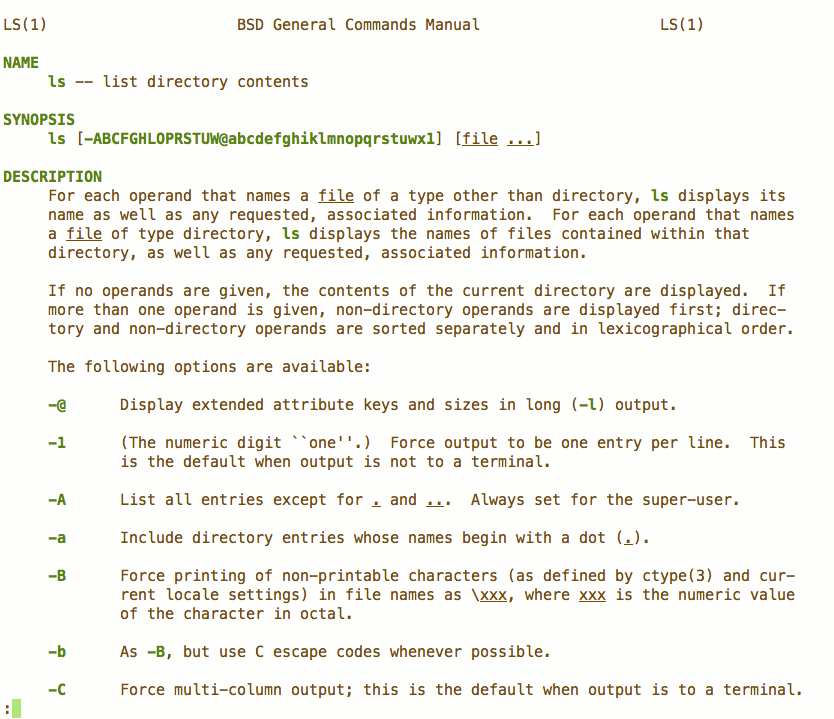
| man [command] | displays the manual for command |
Terminal Activities
# navigate to your hard drive
cd ~/    #Linux, Mac
cd C:\   #Windows

# make a directory called code
mkdir code

# navigate into the directory
cd code
Terminal Activities Continued
# make a directory called gdi_class0
mkdir gdi_class0

# navigate into the directory
cd gdi_class0

# create a file
touch class0.rb

# list the contents of the directory
ls
Terminal Activities
man ls
Output:
Questions?
What is programming?
- Teaching the computer to do a task.
- A program is made of one or more files of code, each of which solve part of the overall task.
- Programming code is human readable but also needs a form that the computer can run directly. This form is not human readable.
- Programming is just learning a language that computers can use
Programming Languages are also read by people
"Code is written once, but read many times"
Code that's easy to read is also actually easier to write too
Writing code the easy way
- Break each requirement into the shortest possible sentence to describe it
- Write each sentence as a comment
- Translate each sentence into code
- Read the comments to make sure code does what we wanted
# comments are just text annotations in code

# denote a comment in ruby using the hash/pound/octothorpe

# text in comments is ignored by interpreters and compilers
Let's Develop It!
Let's write out the sentences for a small program that takes in a users age and returns their age in dog years
Homework
Practice: Practice navigating and creating/removing documents and directories with the command line using "A Command Line Crash Course"
Prep: Work through Code Academy's "Intro to Ruby". If you don't have previous programming experience, read Chapters 1 and 2 in Learn to Program - don't try to do the exercises at the end, though.
Resources
Learning is more fun with people!
- Start a study group with some classmates
- Attend the GDI Code & Coffee extra help and study time.
- Attend the Rails Girls Atlanta meetup with women learning Ruby and Rails.
- Attend the Women Who Code Atlanta Code Jams and monthly meetups to study and learn about being a developer.